
几步安装,
从工作台开始。A few steps to install.
Start in your workbench.
Broadlatus 自动检测 WorkBuddy、准备技能与工作区。已有客户资料继续保留。Broadlatus detects WorkBuddy and prepares your skill and workspace. Existing customer files stay in place.
Windows 公开测试版,首次运行可能出现系统提示。Windows public preview. Windows may show a prompt on first run.
从官网下载,双击打开。Download here, then double-click.
在已安装 WorkBuddy 的 Windows 电脑上下载安装程序。安装 Broadlatus 和使用免费基础能力无需注册;实际 AI 任务使用你自己的 WorkBuddy 账号与模型额度。Download the installer on a Windows computer with WorkBuddy installed. Broadlatus setup and the free foundation do not require registration. AI tasks use your own WorkBuddy account and model access.
Broadlatus-Setup-0.1.0-preview.20.exeMac 版尚未开放下载;请不要在 Mac 上运行此 Windows 安装程序。The Mac installer is not available yet. Do not run this Windows installer on a Mac.
如果 Windows 显示提示,先核对来源。If Windows shows a prompt, check the source.
当前公开测试版尚未配置 Windows 发行签名,系统可能显示“无法识别的应用”或“未知发布者”。不同 Windows 版本和单位电脑策略的提示可能不同。This public preview does not yet have Windows publisher signing. Windows may show an unrecognized app or unknown publisher. Wording and available actions vary by Windows version and organization policy.
“Windows 已保护你的电脑”“Windows protected your PC”
只有在确认文件来自本页官网下载、版本相符,且系统提示仅为“无法识别的应用”时,才考虑继续。你可以查看“更多信息”,核对后自行决定是否“仍要运行”。Only consider continuing after confirming the file came from the official download on this page, the version matches, and the prompt concerns an unrecognized app. Open More info, review the details and decide whether to Run anyway.
管理员授权是另一种提示。Administrator permission is a separate prompt.
安装到 Program Files 时,Windows 会请求管理员授权。没有权限或不希望授权时,可返回位置选择页,点击“免管理员安装”。Windows requests administrator permission for Program Files. If you cannot or prefer not to grant it, return to the location page and choose the per-user installation option.
不需要关闭 Windows 安全防护。若系统明确报告病毒、恶意软件或文件损坏,请停止安装并联系支持。There is no need to disable Windows security. If it specifically reports malware or a damaged file, stop installation and contact support.
保留默认位置,或按需更改。Keep the defaults, or choose your locations.
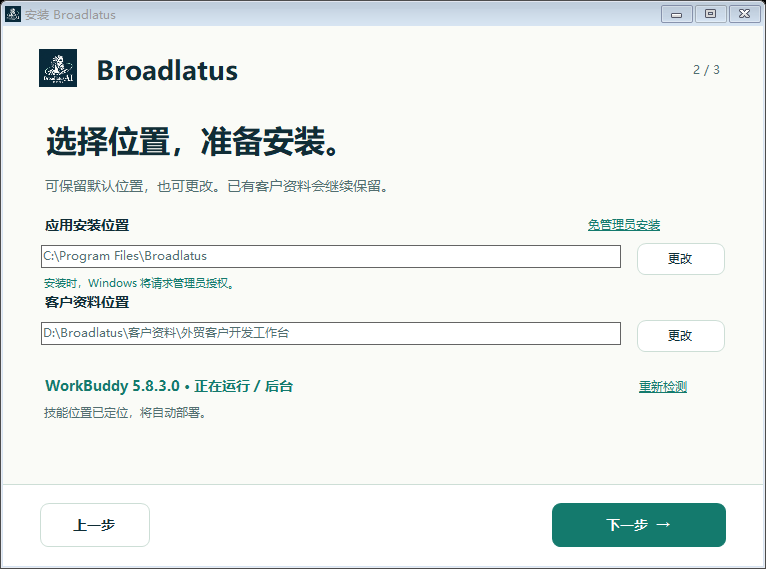
依次点击“下一步”。程序位置与客户资料位置分开,位置选择页会显示检测到的 WorkBuddy 及部署状态。Follow Next. The app and customer data use separate locations. Setup shows the detected WorkBuddy and deployment status.
- 自动检查已安装的 WorkBuddy,不需要为了检测特意启动或关闭助手。WorkBuddy detection works without requiring you to start or close the assistant.
- 已有客户工作区继续沿用,不重新初始化覆盖资料。An existing customer workspace is reused rather than reinitialized.
- 已有同名技能存在差异时,先说明并确认备份,再继续部署。If an existing same-name skill differs, review and confirm its backup before setup continues.
- 查看使用许可和隐私说明,同意后开始安装。Read the licence and privacy notice, then agree to start installation.
截图中的路径和助手状态为界面示例,实际以你的电脑和所选位置为准。Screenshot paths and assistant status are interface examples; your computer and chosen locations determine the actual setup.
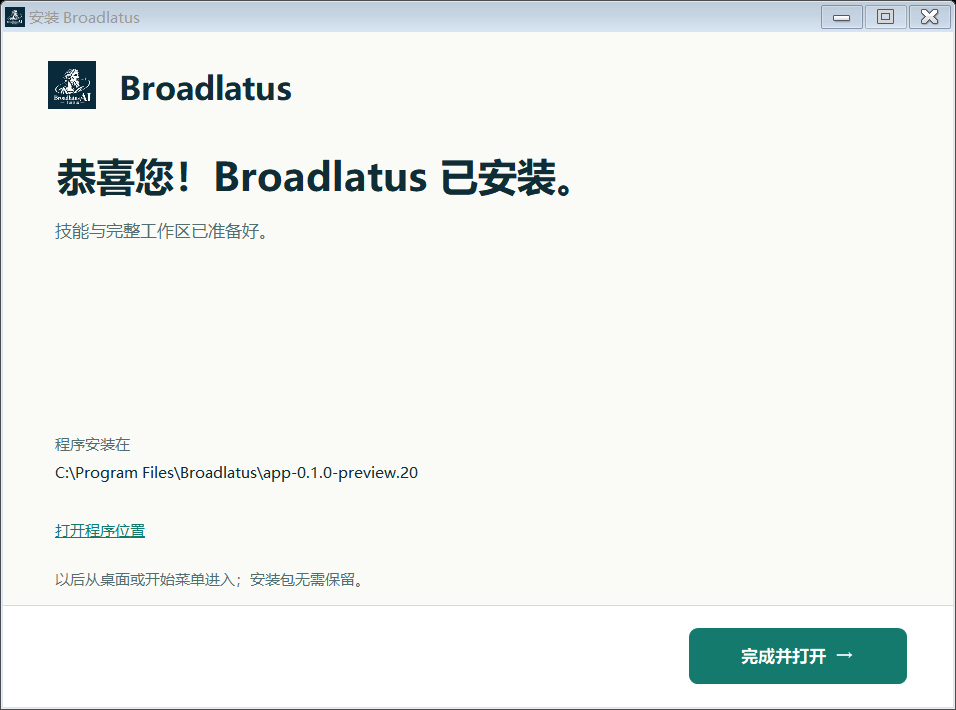
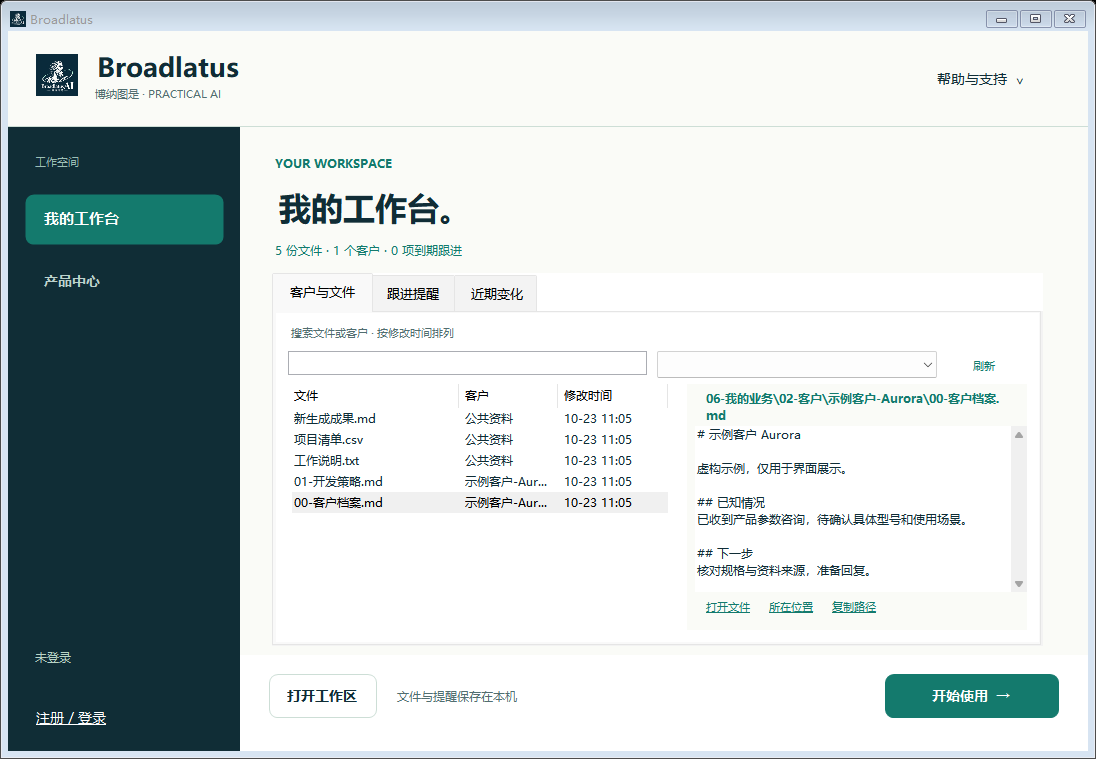
点击“完成并打开”,进入我的工作台。Choose Finish and open to enter My workbench.
安装成功后,Broadlatus 会显示完成状态。点击“完成并打开”,直接进入“我的工作台”,查看客户资料、文件变化和跟进提醒。After successful setup, Broadlatus shows the completion screen. Choose Finish and open to enter My workbench, where you can find customer files, file changes and follow-up reminders.
点击工作台右下角“开始使用”,按指引在 WorkBuddy 中继续。以后从桌面或开始菜单打开 Broadlatus,下载的安装包可以删除。Choose Start using in the workbench to continue in WorkBuddy. Return through the desktop or Start menu; the downloaded installer can be deleted.
遇到卡点,可以从这里继续。If you get stuck, continue here.
没有找到 WorkBuddy,怎么办?What if WorkBuddy is not found?
确认 WorkBuddy 已安装,再点击“重新检测”。必要时可选择已经安装的 WorkBuddy 程序。也可以先完成 Broadlatus 安装,之后从应用中继续部署;助手与技能未准备好时,应用会如实显示待完成状态。Confirm WorkBuddy is installed and choose Detect again. If needed, select its installed executable. You can also finish installing Broadlatus and continue skill setup later; pending assistant or skill setup is shown as pending.
重新安装、更新或卸载,会怎样处理客户资料?What happens to customer files when reinstalling, updating or uninstalling?
重新安装和更新沿用已有客户工作区。客户资料与程序文件分开保存;卸载 Broadlatus 会保留客户资料、助手技能和历史备份。重要业务资料仍建议自行保留备份。Reinstallation and updates reuse the existing workspace. Customer data is stored separately from app files. Uninstalling Broadlatus retains customer files, assistant skills and historical backups. Keep your own backup of important business data.
需要手动核对下载文件吗?How can I verify the downloaded file?
一般用户可以先核对官网地址和文件版本。需要进一步核对时,可将下载文件的 SHA-256 与下面的值比较。文件校验不能代替 Windows 发行者签名。Start by checking the official address and file version. For an additional check, compare the downloaded file’s SHA-256 with the value below. File integrity checks do not replace Windows publisher signing.
4de85f6a3374dedc20a885cfdb77226a9cc5b928b6fc92ba01c177a79fe380f9