把 AI 用进真实业务。从一个客户开始。Put AI into real business. Start with one customer.
桌面应用 + 外贸标准技能DESKTOP APP + TRADE STANDARD SKILL

装好 Broadlatus,
从一个客户开始工作。
Install Broadlatus.
Start work with one customer.

应用留在你的电脑上,负责检查环境、部署技能、查找客户文件与提醒跟进。随应用交付的外贸标准技能,在你的 WorkBuddy 中完成建档、背调、开发策略与邮件准备。The app stays on your computer to check your setup, deploy skills, find customer files and keep follow-ups visible. The included Trade Standard Skill runs in your WorkBuddy for records, research, outreach strategy and email preparation.

随应用交付外贸标准技能 V0.4.7 · 完整基础能力免费Trade Standard Skill V0.4.7 included · Complete free foundation
当前支持 Windows + WorkBuddy,自备助手账号与模型额度。Mac 版尚未开放。Currently Windows + WorkBuddy. Bring your assistant account and model access. Mac is not available yet.
当前交付 · 免费基础能力INCLUDED TODAY · FREE FOUNDATION

先把一个客户的工作,完整做下来。Complete the work for one customer.

基础技能与完整工作区一并准备好。应用管理入口与本地文件,助手执行 AI 任务,你核对事实并作业务决定。The foundation skill and complete workspace are prepared together. The app manages access and local files, your assistant runs AI tasks, and you verify facts and make business decisions.

01

客户建档与背调Customer records & research

从名片或域名开始,交付一页开发简报、七章完整背调及证据与缺口记录。核对主体、产品、市场、关键人、履约风险、需求与我方匹配,再安排下一步。Start with a card or domain. Get a one-page outreach brief, a seven-chapter research report and evidence/gap records covering identity, products, market, decision makers, risk, needs and fit.

查看使用说明Read the guide
02

开发阶段与策略Stages & outreach strategy

按九阶段行动手册判断进展,明确每阶段要做什么、关注什么、准备什么、凭何推进或暂停;按需使用阶段工作表。Use the nine-stage action guide to assess progress, actions, focus, preparation and conditions for moving ahead or pausing, with worksheets created as needed.

查看使用说明Read the guide
03

邮件撰写与独立评审Email drafting & independent review

按邮件原则准备事实和沟通目标,Writer 起草;独立 Critic 依据校准示例按六维100分评审。至少95分且无阻塞,再由人核对;保留修订和复评记录。Prepare the facts and communication goal, then draft with the Writer. A separate Critic uses calibrated examples for a six-dimension, 100-point review. Target at least 95 with no blocker, then review it yourself. Keep revisions and rechecks.

查看使用说明Read the guide
04

本地文件与持续跟进Local files & continuing work

档案、联系人往来、日志与状态持续保存。在桌面工作台审核客户事项、核对原始依据、输入新的变化,安排本地跟进提醒。Keep archives, contact history, logs and status. Review customer requests and their evidence, record new information and set local follow-up reminders in the desktop workbench.

查看使用说明Read the guide

安装与基础使用无需注册。模型使用费按你的助手与模型服务商规则计算。当前不自动发信、不接入邮箱,也不把客户工作区同步到官网。No account is required for installation or core use. Model charges follow your assistant and provider. This release does not send emails automatically, connect your mailbox or sync your customer workspace to the website.

先看成果SEE THE OUTPUTS

信息整理好,开发动作有依据。Clearer information. Better-grounded next moves.

从一份名片到客户档案,从一封来信到回复策划与下一步。切换下方标签,看看会留下什么。From a card to an archive, from a reply to a communication plan and next move. Explore what you keep.

输入INPUT名片、会谈与虚构公开资料Card, meeting notes & fictional research
02-示例输入Inputs↓03-成果Outputs02-客户/001-Northline Systems/00-客户档案.md

每次跟进时,AI先读取工作区资料,结合历史记录分析后继续。When you resume a follow-up, AI first reads your workspace files and analyzes the history before continuing.

BroadlatusV0.4.7 · 示例摘要Sample excerpt

Northline SystemsNorthline Systems

客户情况Context
加拿大卡尔加里的系统集成商;示例资料模拟公开来源,未经真实外部核验。A systems integrator in Calgary, Canada, according to fictional exercise sources; not live-verified.
已知需求Known request
关注户外相机供电,先确认场景与参数。Interested in power for outdoor cameras; clarify the setting and requirements first.
待确认Unknowns
功耗、供电方式、现场环境与采购计划。Power needs, supply method, environment and purchasing plan.

虚构样本的固定展示,便于了解产物结构;本页不调用模型。A fixed fictional example illustrating output structure. This page does not call a model.

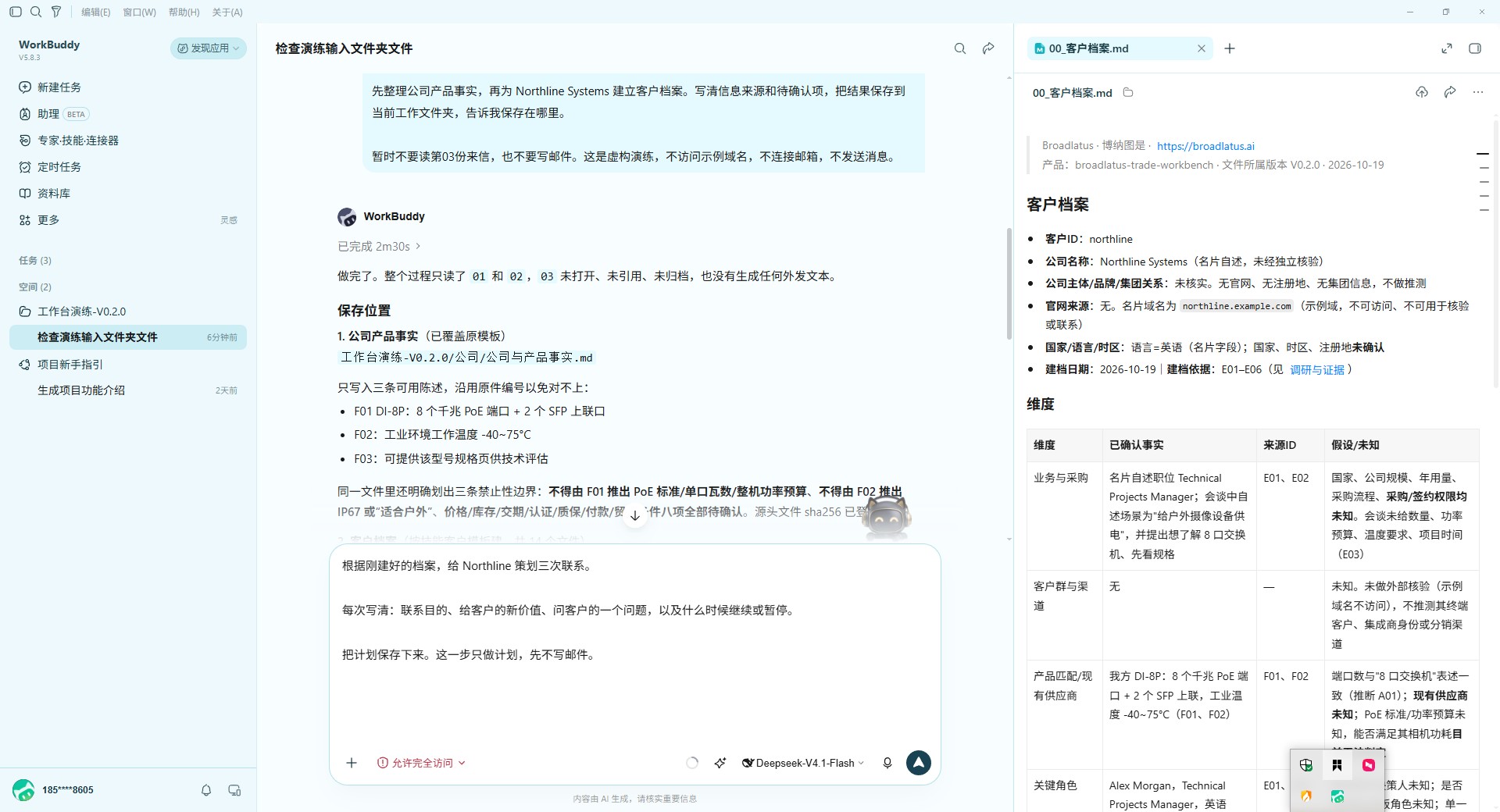
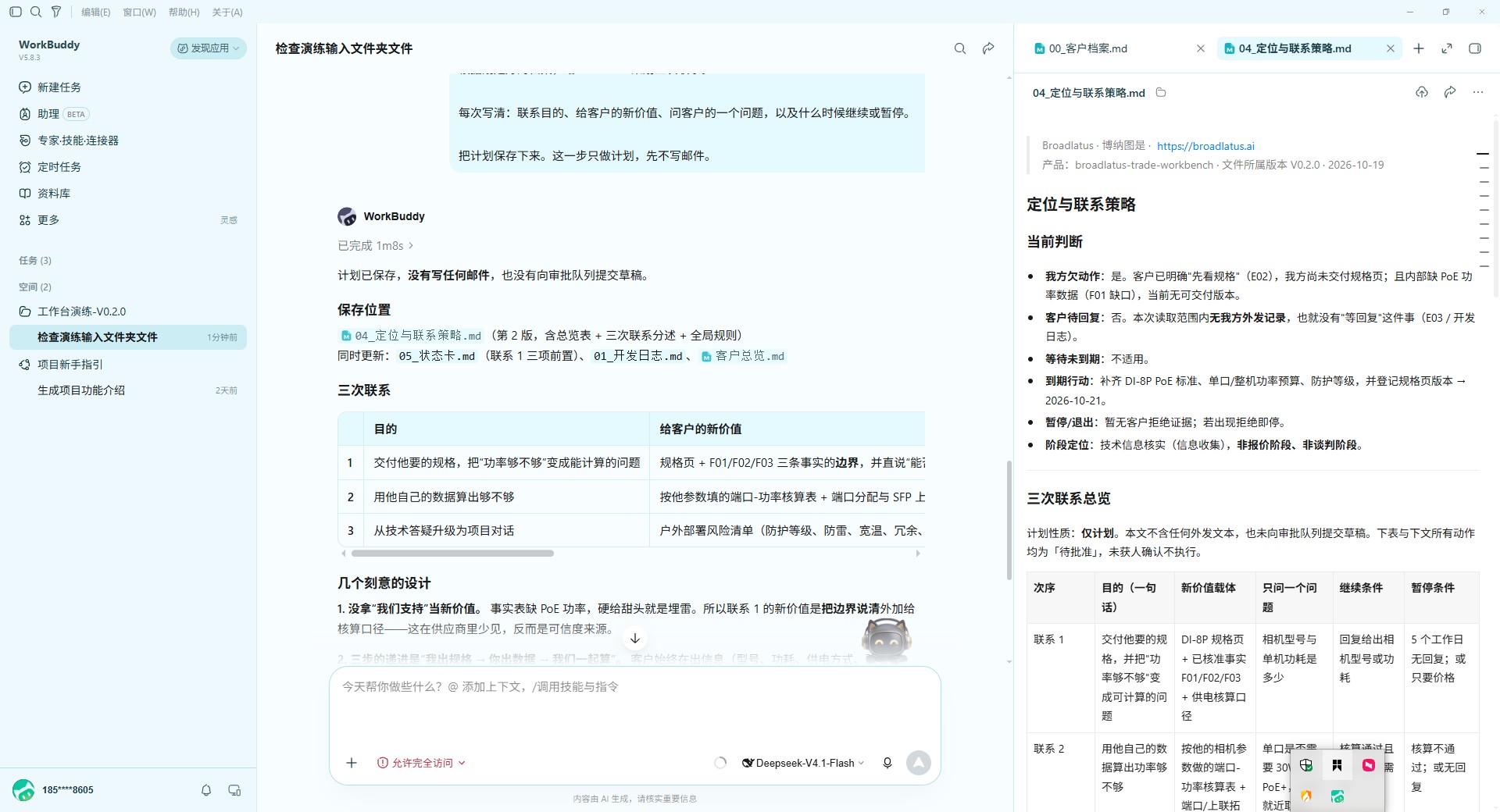
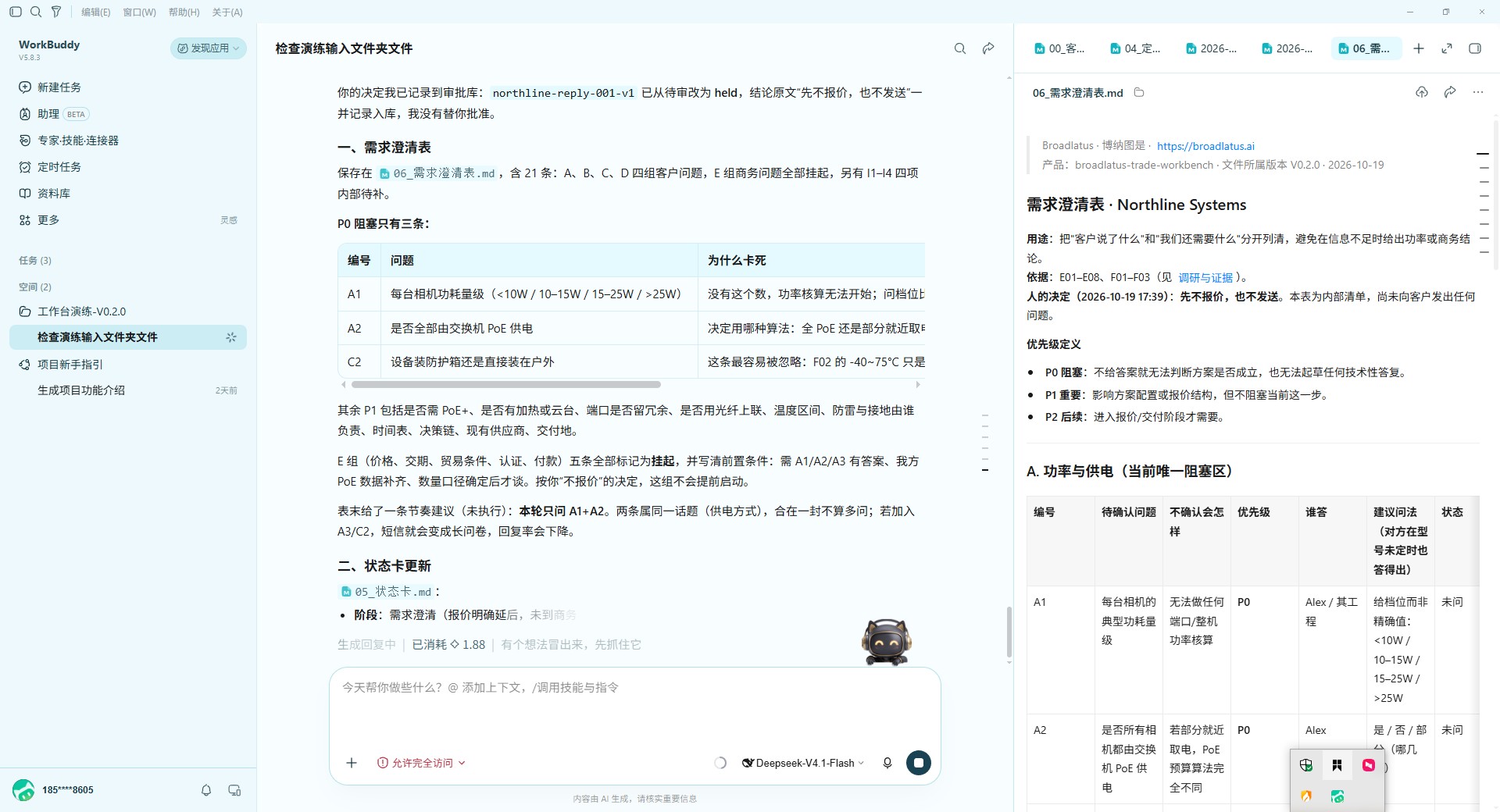
查看实测截图参考View real-run screenshot referencesWorkBuddy 实操记录 · V0.2.0WorkBuddy process record · V0.2.0展开查看View screenshots收起截图Hide screenshots

来自另一台电脑的旧版WorkBuddy实操记录,仅作过程参考;当前安装与使用以桌面应用及最新指引为准。An older WorkBuddy run on another computer, illustrating the process. Follow the desktop app and latest guides for current setup and usage.

客户档案客户档案Customer archive沟通计划沟通计划Contact plan人工决定与澄清人工决定与澄清Decision and clarification
从开始使用,到持续跟进FROM GETTING STARTED TO CONTINUING WORK

就按这六步,完整走一遍。Six steps. One complete first run.

名片和来信都是虚构样本。一次只发一段指令,每步都有该看到的结果;六步全部免费。Use a fictional card and reply. Send one prompt at a time and check the result before continuing. All six steps are free.

01

检查技能与完整结构Check the skill and structure

确认技能V0.4.7、四份输入及完整目录。Confirm skill V0.4.7, four inputs and complete folders.

↳ 技能V0.4.7与当前目录正确;示例与真实业务分开。The skill is V0.4.7; exercise and real business are separate.
02

建档与材料内背调Archive and evidence-based diligence

填齐客户档案、背调、证据、日志和联系人独立记录。Populate archives, research, evidence, logs and per-contact records.

↳ 完整客户结构已保存,来源和未知项明确,总览有对应链接。The full archive is saved, with sources, unknowns and an overview link.
03

策划三次沟通Plan three contacts

写清三轮目标、价值、问题与推进条件。Define goals, value, questions and progress criteria for three contacts.

↳ 策略有依据、条件和复核日,日志/状态/总览同步。Strategy has evidence and conditions; records are synchronized.
04

Writer起草,交给独立CriticWriter draft and independent Critic

Writer只写;独立Critic六维评分,至少95分且无阻塞。Writer writes; an independent Critic applies six dimensions, at least 95 and no blocker.

↳ Writer稿与交接已保存;独立Critic通过后才生成可用待确认稿。Writer and handoff are saved; a usable draft requires independent Critic approval.
05

分析来信,再独立评审Analyze the reply and review it

保存来信与分析,撰写回复并独立评分、必要时复评。Keep the reply and analysis, draft and independently review the response.

↳ 原信、分析、Writer与Critic记录分开;无虚构订单和承诺。Original reply, analysis, Writer and Critic records are separate; no invented order or promise.
06

记录决定与持续归档Record decisions and maintain files

保留人的决定,联动更新澄清、状态、日志与总览。Record your decision and synchronize questions, status, logs and overview.

↳ 档案可读、记录相互一致;保留未报价、未发送和未通过项。Files are readable and consistent; no quote, not sent and failed review states are preserved.
从桌面开始使用,在自己的助手中完成工作。Start from your desktop and complete the work in your assistant.

Broadlatus 自动准备外贸技能、完整工作区和使用指引。从桌面进入,在自己的助手中继续。Broadlatus prepares the trade skill, complete workspace and guides. Start from your desktop and continue in your own assistant.

下载 BroadlatusDownload Broadlatus ↓查看一步一步操作Read the step-by-step guide

环境检查与目录创建在本地完成,无需Python或邮箱配置。按指引在自己的助手里确认技能,并完成六步成果验收。Environment checks and workspace creation run locally, without Python or mailbox setup. Confirm the skill in your own assistant and verify the complete records and independent review.

后续方向 · 尚未上架PLANNED · NOT YET AVAILABLE

更多能力,沿用同一个桌面入口。More capabilities. The same desktop entry.

已交付的基础能力继续免费保留。后续技能与产品计划通过 Broadlatus 产品中心展示、安装和更新;每次正式发布都会说明版本、适用助手、权限与费用。The delivered foundation remains free. Future skills and products are planned for discovery, installation and updates through the Broadlatus Product Center. Each release will specify its version, supported assistant, permissions and price.

获客与开发自动化Prospecting & outreach automation

把线索整理、任务组织与跟进流程衔接起来,保留人的确认。Connect lead organization, tasks and follow-up workflows with human approval.

产品资料与业务策划Product information & planning

把产品事实、客户问题与可复用的业务方案连接起来。Connect product facts, customer questions and reusable business plans.

更深入的行业技能Deeper industry skills

围绕具体岗位与任务,继续沉淀规则、工作流与可核对的成果。Develop rules, workflows and reviewable outputs for specific roles and tasks.

当前未开放独立在线产品库、购买与积分交付。注册或订阅不代表购买,也不自动获得未发布功能。The independent online catalog, purchases and points delivery are not open. Registration or subscription does not purchase or unlock unreleased features.

开始前,先判断适不适合CHECK THE FIT

开始前,准备好这些。What you need before starting.

面向外贸业务员、独立经营者、工厂负责人。协助整理客户、分析沟通、策划回复、智能指导开发动作;通过实际资料与人的核对,逐步建立自己的工作方法。For export salespeople, independent operators and factory managers. Organize customer information, analyze communication, plan replies and guide customer-development moves, using real inputs and human review.

✓ 已安装并会基本使用 WorkBuddyWorkBuddy installed with basic usage skills

✓ 自备工具账号、模型与使用额度Your own tool account and model access

✓ 先用示例熟悉流程,再提供自己的业务事实Start with an example, then supply your own business facts

✓ 对外邮件、报价与商业结论由你核对You review external email, quotes and commercial decisions

当前自动部署支持 Windows + WorkBuddy。客户资料保存在本地;助手的文件读取、联网与模型能力按实际权限和配置使用。Automatic setup currently supports Windows + WorkBuddy. Customer files stay local. Assistant file access, research and model capabilities depend on its permissions and configuration.

常见问题COMMON QUESTIONS

开始之前,讲清楚。Before you start.

Broadlatus 与外贸技能是什么关系?How do Broadlatus and the trade skill fit together?

Broadlatus 是留在你电脑上的桌面应用平台;外贸客户开发技能是首个产品。应用负责检测、部署和指引,实际 AI 任务由自己的 WorkBuddy 完成,客户资料保存在选择的本地工作区。Broadlatus is a desktop application platform. The trade customer-development skill is its first product. The app handles detection, setup and guidance; AI tasks run in your WorkBuddy and files remain in your selected local workspace.

免费部署会做到一半就要求付费吗?Does core use stop halfway for payment?

不会。完整基础能力免费:客户建档/背调、开发策略、独立邮件评分、九阶段及持续档案。高级销售Skills、邮箱和自动化后续发布,不会在基础流程中途收取费用。No. The complete foundation is free for practice and real work: archives, research, strategy, independent review, nine stages and continuing records. Advanced sales Skills, email integration and automation are planned; the foundation does not stop halfway for payment.

手机和电脑怎么配合使用?How do computer and phone use work together?

首次基础部署以电脑端为主,需要助手能读取工作目录、加载技能并保存成果。手机端能否继续使用,取决于所选助手的文件访问与同步能力,按工具实际支持范围操作。Use a computer for initial setup, with an assistant that can read the workspace, load the skill and save outputs. Continuing on a phone depends on the assistant’s file-access and synchronization capabilities.

第一次要准备什么?What do I need to start?

准备 Windows 电脑、已安装的 WorkBuddy 和自己的模型额度。下载 Broadlatus,双击安装,自动准备技能与工作区,再从桌面点击“开始使用”。Prepare a Windows computer with WorkBuddy installed and your own model access. Download Broadlatus and double-click to prepare the skill and workspace, then choose Start using from your desktop.

网页演示会实际处理我的资料吗?Does the web demo process my information?

不会。页面展示虚构样本和固定的工作关系,不调用大模型、不连接邮箱。真实任务在你自己的助手里执行;资料访问和模型处理范围取决于你使用的工具与权限。No. The page illustrates a fictional sample. It does not call a model or connect to mail. Actual tasks run in your assistant; data access and model processing follow that tool and its permissions.

可以自动发信或通过邮件回复批准吗?Can it send customer emails or approve by email?

当前不提供这两项能力。后续进阶计划在配置与验收后采集来信、保留待办、生成内部决策与本人晨报;AI继续执行仍依赖你的助手与定时任务,商业动作由人确认。Neither is provided in this release. Planned advanced tools would collect mail, keep pending work, prepare internal decisions and email owner briefings after configuration and acceptance. AI execution still needs your assistant and scheduler; people approve business actions.

进阶怎样参与,服务如何安排?How do I participate, and how is support arranged?

从“后续方向”和方法页了解规划,无需注册。可通过产品支持交流具体问题,或自愿订阅发布资讯。模块内容、获取方式、工具条件及可能涉及的费用会在参与前说明;专属适配与部署按范围约定。Explore planned directions and methods without an account. Discuss questions through support or optionally subscribe to release news. Module scope, access, requirements and any fees are explained beforehand; adaptation and setup are separately scoped.

用完以后,成果能继续保留吗?Can I keep the outputs?

可以。工作成果写入你选择的目录;你自己的业务信息和生成资料不因使用工作台转让给平台。技能包的修改与再分发按使用许可执行。Yes. Outputs are saved in your workspace. Your business inputs and generated files do not transfer to the platform. Modifying or redistributing the skill pack follows its licence.

你的反馈,是产品持续精进的起点。Your feedback helps the product improve.

遇到问题、发现有效做法,或有新的业务需求,都欢迎告诉我们。可直接写文字、粘贴截图或拖入文件;业务适配与部署先确认范围。Share an issue, a useful approach or a new business need. Write a note, paste screenshots or drop in files. Adaptation and deployment start with an agreed scope.

更多联系方式More ways to contact us →
下载说明Download notice

使用许可与下载须知Licence Terms & Download Notice

请阅读以下使用范围与说明,再下载所选资料。Review the permitted uses and notices below before downloading.

条款版本:2026-10-13-v1;不同产品按各自许可交付。Terms: 2026-10-13-v1. Product-specific licences apply.

查看完整使用许可说明Read the full usage and licence terms

Broadlatus 账号Broadlatus account
免费注册 · 持续精进FREE ACCOUNT · KEEP IMPROVING

用邮箱,开始。Start with your email.

首次验证后创建账号;已有账号直接登录。First-time verification creates an account. Returning users sign in.

留言与反馈MESSAGES & FEEDBACK

像发消息一样,告诉我们。Send us a message.

使用问题、改进建议、新的业务场景,我们都愿意听。文字、截图和相关文件放在同一个窗口里,邮箱选填,无需先注册。Issues, suggestions or new business needs—we welcome them all. Add text, screenshots and relevant files in one composer. A reply email is optional; no account is needed.

粘贴截图 · 拖放文件Paste screenshots · drop files

最多 3 个文件,每个不超过 5 MB。支持图片、PDF、Word(DOCX)、Excel(XLSX)及文本文件。Up to 3 files, 5 MB each. Images, PDF, DOCX, XLSX and text files are supported.

补充版本和工具信息(选填)Version and tool details (optional)

业务咨询BUSINESS INQUIRY
说清需求,让沟通更高效A CLEAR BRIEF. A BETTER CONVERSATION.

整理一份咨询说明Prepare an inquiry

只需先填写想解决的问题,其余可选。我们会把信息整理成一份清楚的沟通提纲,方便你核对和发送。Start with the problem you want to solve; other fields are optional. We will organize your answers into a clear brief for you to review and send.

01你的业务与目标Your business and goal
02现状与期望Current situation and expectations
03整理并发送Prepare and send

信息仅在当前页面整理,不调用 AI、不自动提交。请使用脱敏描述;生成后核对,可主动提交网站留言,或通过邮件、微信发送。Your answers stay on this page. No AI call or automatic submission is made. Use anonymized descriptions, then review and submit a website message, or send the brief by email or WeChat.

邮件联系EMAIL CONTACT

选择你的发信方式Choose how to send