免费部署 · 一次行动,开启外贸客户开发智能化FREE SETUP · YOUR FIRST STEP INTO AI-ASSISTED SALES
一次部署, 让 AI 帮你做外贸。Set up your workbench. Bring AI into export sales.
下载免费部署数据包,完成解压、技能安装和工作区选择,再用一个虚构客户完成六步实操。从建档到回复与下一步,让助手按你的业务规则协助工作。Download the free setup pack, extract it, install the skill and select the workspace. Then take a fictional customer through six steps, from an archive to replies and next actions.
基础部署无需配置邮箱或运行自动化脚本。操作指令提供中英文;包内文件以中文为主,文件名与目录名请保持原样。Basic setup needs no mailbox connection or automation scripts. Prompts are available in Chinese and English; pack files are primarily Chinese. Keep the original folder and file names.
基础部署BASIC SETUP
先装好工作台,再完成六步实操。Set up first. Then follow the six steps.
下载与基础部署免费,助手账号及模型额度自备。准备完成后,在同一个对话中逐步操作,每步核对结果后再继续。The download and basic setup are free; bring your own assistant account and model access. Continue in one conversation and check each result before the next step.
01 · 下载并完整解压01 · Download & extract解压免费部署数据包,先打开“开始使用.html”;不要直接在压缩窗口中操作。Extract the entire free setup pack and open 开始使用.html. Do not work inside the ZIP viewer.
02 · 安装工作台技能02 · Install the skillWorkBuddy 导入根目录的 Trial-Skill ZIP;Codex 按包内说明安装“技能”目录中的完整技能文件夹。In WorkBuddy, import the Trial-Skill ZIP in the pack root. In Codex, follow the included guide to install the complete skill folder from 技能.
03 · 选择工作区并新建对话03 · Select the workspace选择包内“体验工作区”,新建对话,再按下面六步逐段发送指令。Select 体验工作区 from the pack, start a new conversation and send the six prompts below one at a time.
照着截图做,也知道哪里不同Use the screenshots with the current instructions
下载包 V0.3.1 新增手把手图文指引与PDF:从解压、导入技能、选择目录,到每步输入、结果核对与修正。旧实测截图来自 V0.2.0 完整包,只说明共同操作;当前文件名和技能名按新版说明,自动化与审批配置不属于免费六步。Pack V0.3.1 includes an illustrated guide and a Chinese PDF covering extraction, installation, workspace selection, prompts, checks and corrections. The original V0.2.0 full-package screenshots illustrate shared actions; use current filenames and the trial skill name. Automation and approval setup are outside the free exercise.
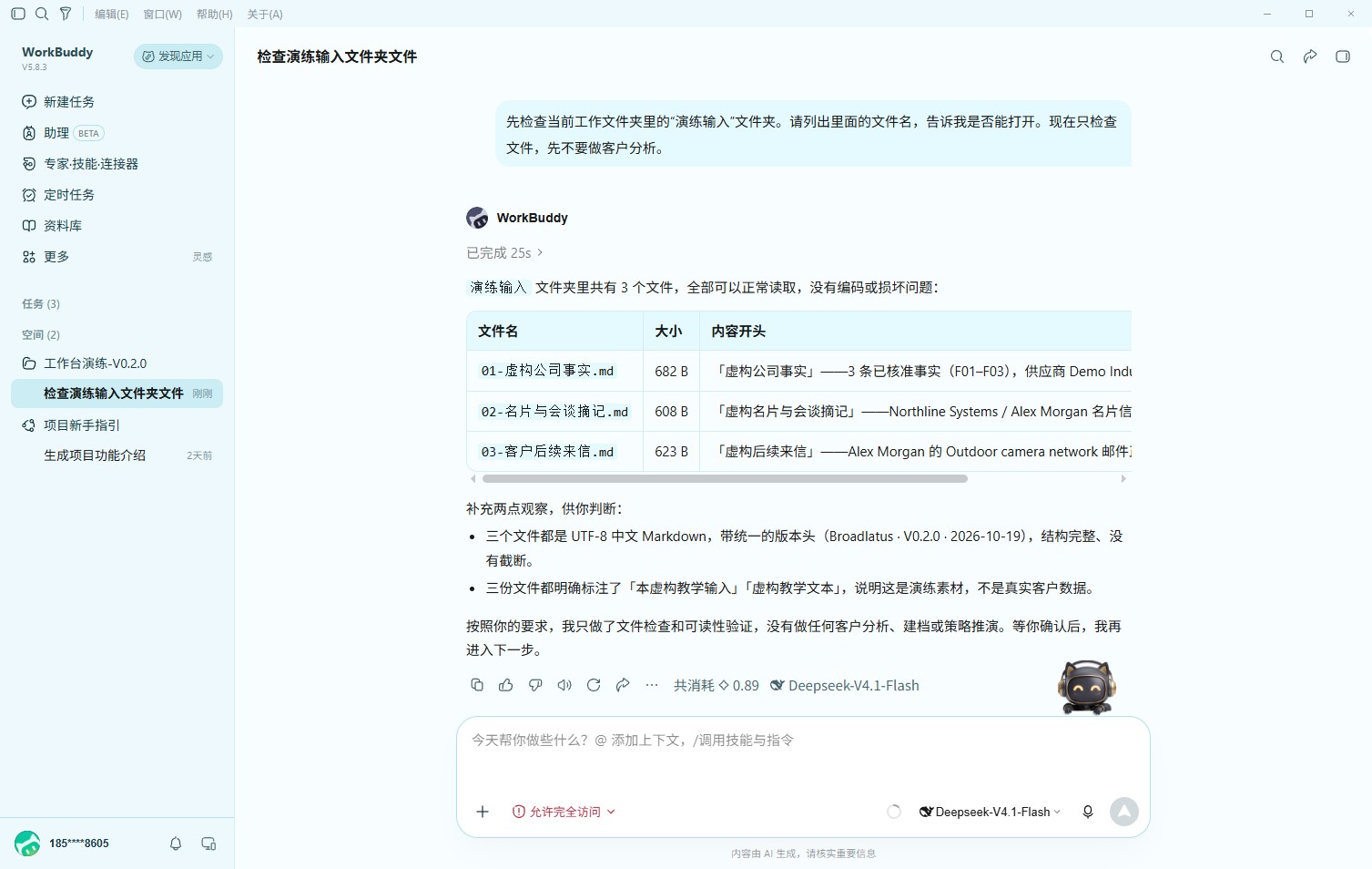
先检查当前工作文件夹里的“演练输入”文件夹。请列出里面的文件名,告诉我是否能打开。现在只检查文件,先不要做客户分析。Check the 演练输入 folder in this workspace. List its files and confirm whether you can open them. Only check the files for now; do not analyze the customer.
看到什么才继续Check before continuing
三份文件都能打开;不能打开就先停下处理。All three files open. Stop and fix access if they do not.
真实实测第1步:三份输入可读取。这是通过标准的示例,不要求你的回复逐字相同。Actual V0.2.0 test, step 1: all three input files were readable. Your wording can differ.点击查看原图。Open the image to zoom.结果不对怎么办?What if the result is wrong?
先检查选中的工作区,确认“演练输入”存在。Check the selected workspace and the 演练输入 folder.
第2步 / 共6步Step 2 of 6
整理事实、建立档案Facts & customer archive
复制这一段到对话框Copy this into the conversation
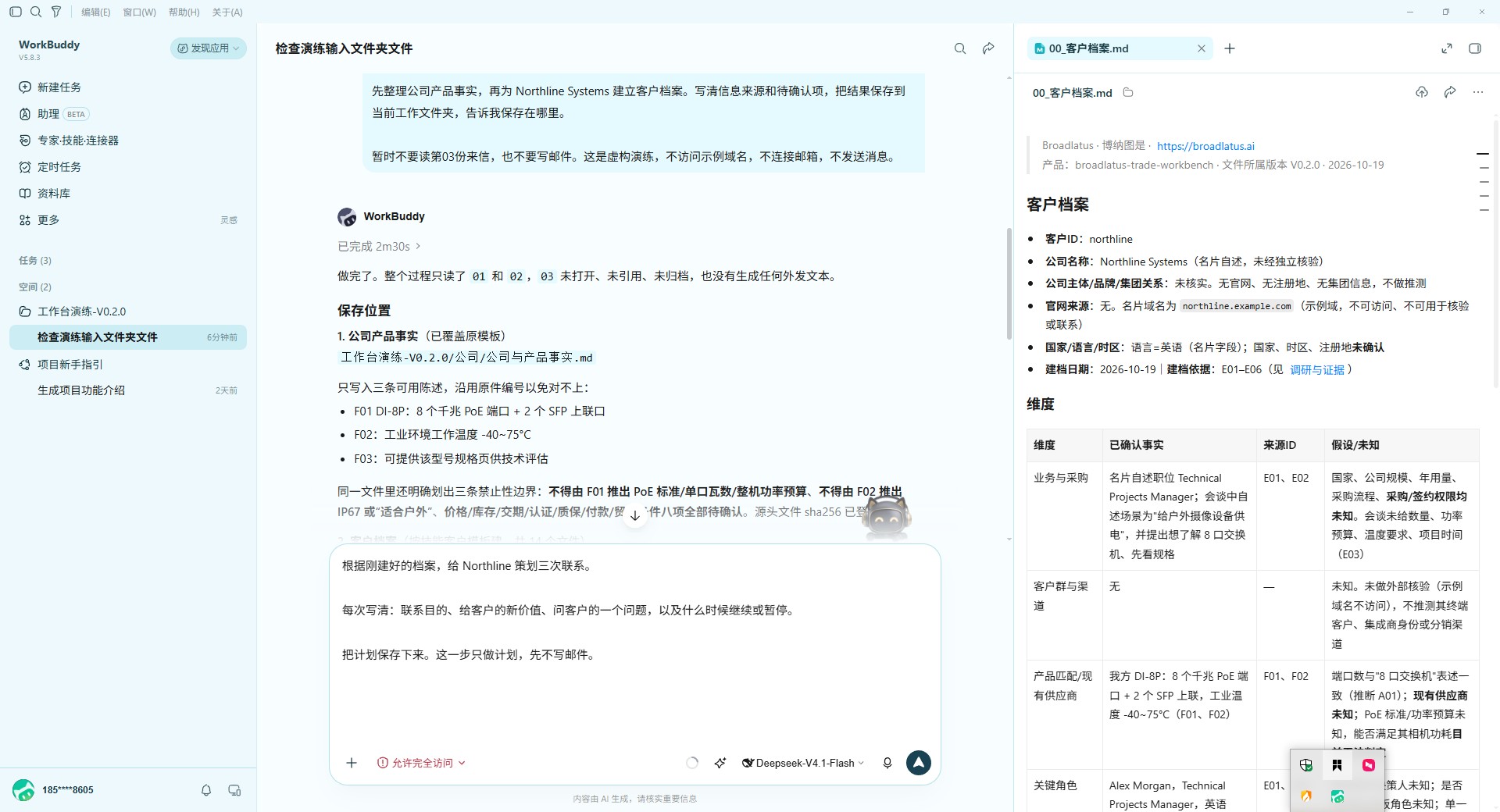
请使用 broadlatus-trade-workbench-trial 体验技能,只读取演练输入里的01-虚构公司事实.md和02-名片与会谈摘记.md。整理公司事实,为Northline Systems建档,注明来源与待确认项。保存到当前工作区并给我文件链接。暂时不读03,不写邮件。这是虚构演练,不访问示例域名、不连接邮箱、不发送。Use broadlatus-trade-workbench-trial. Read only 01-虚构公司事实.md and 02-名片与会谈摘记.md in 演练输入. Organize company facts and build a sourced archive for Northline Systems, marking unknowns. Save the files in this workspace and link to them. Do not read file 03 or draft email yet. This is a fictional exercise: no domain visits, mailbox connections or sending. Explain your work in English.
看到什么才继续Check before continuing
客户档案、公司事实及未知项有来源;价格、交期和功率不凭空补全。Sourced facts, an archive and unknowns; no invented price, timing or capacity.
真实实测第2步:点击文件链接后打开客户档案,能看到来源与待确认项。免费版目录可与旧图不同,以你实际文件链接为准。Actual V0.2.0 test, step 2: open the saved archive and inspect sources and unknowns. Use the paths generated in your run.点击查看原图。Open the image to zoom.结果不对怎么办?What if the result is wrong?
确认工作台技能已导入并启用,要求它指出来源,不用参考答案冒充生成结果。Check that the trial skill is enabled. Ask for sources; do not copy reference answers as generated work.
第3步 / 共6步Step 3 of 6
策划三次联系Plan three contacts
复制这一段到对话框Copy this into the conversation
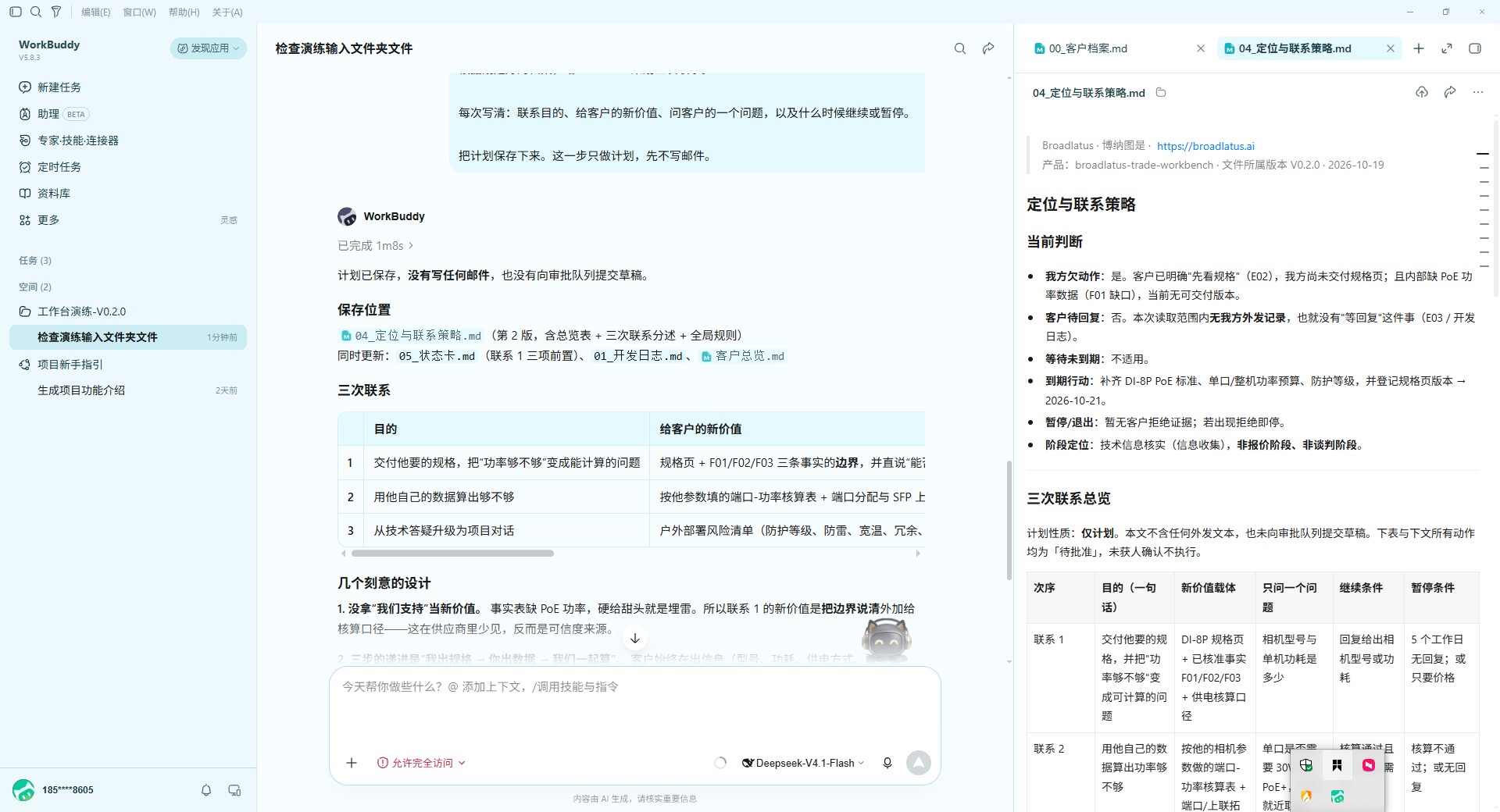
根据刚建好的档案,给Northline策划三次联系。每次写清联系目的、给客户的新价值、问客户的一个问题,以及什么时候继续或暂停。把计划保存下来,先不写邮件。Use the archive to plan three contacts with Northline. For each, specify the purpose, new value, one question and when to continue or pause. Save the plan. Do not draft emails yet.
看到什么才继续Check before continuing
三次联系的目的不同,收到回复后会调整,不是到日子就连发。Different purposes, adjusted when the customer replies; not automatic scheduled sending.
真实实测第3步:三次联系各有不同作用。旧完整包还显示审批或日志字段,免费版不需要配置这些系统。Actual V0.2.0 test, step 3: contacts have different purposes. Old approval fields are not required for the free module.点击查看原图。Open the image to zoom.结果不对怎么办?What if the result is wrong?
把实际结果与上面的预期对照,要求它指出缺口并修正;仍卡住时把版本、步骤和脱敏截图发给产品支持。Compare the output with the expected result. Ask the assistant to identify and correct the gap. If still blocked, send the version, step and anonymized screenshot to support.
第4步 / 共6步Step 4 of 6
准备英文首封稿Draft the first email
复制这一段到对话框Copy this into the conversation
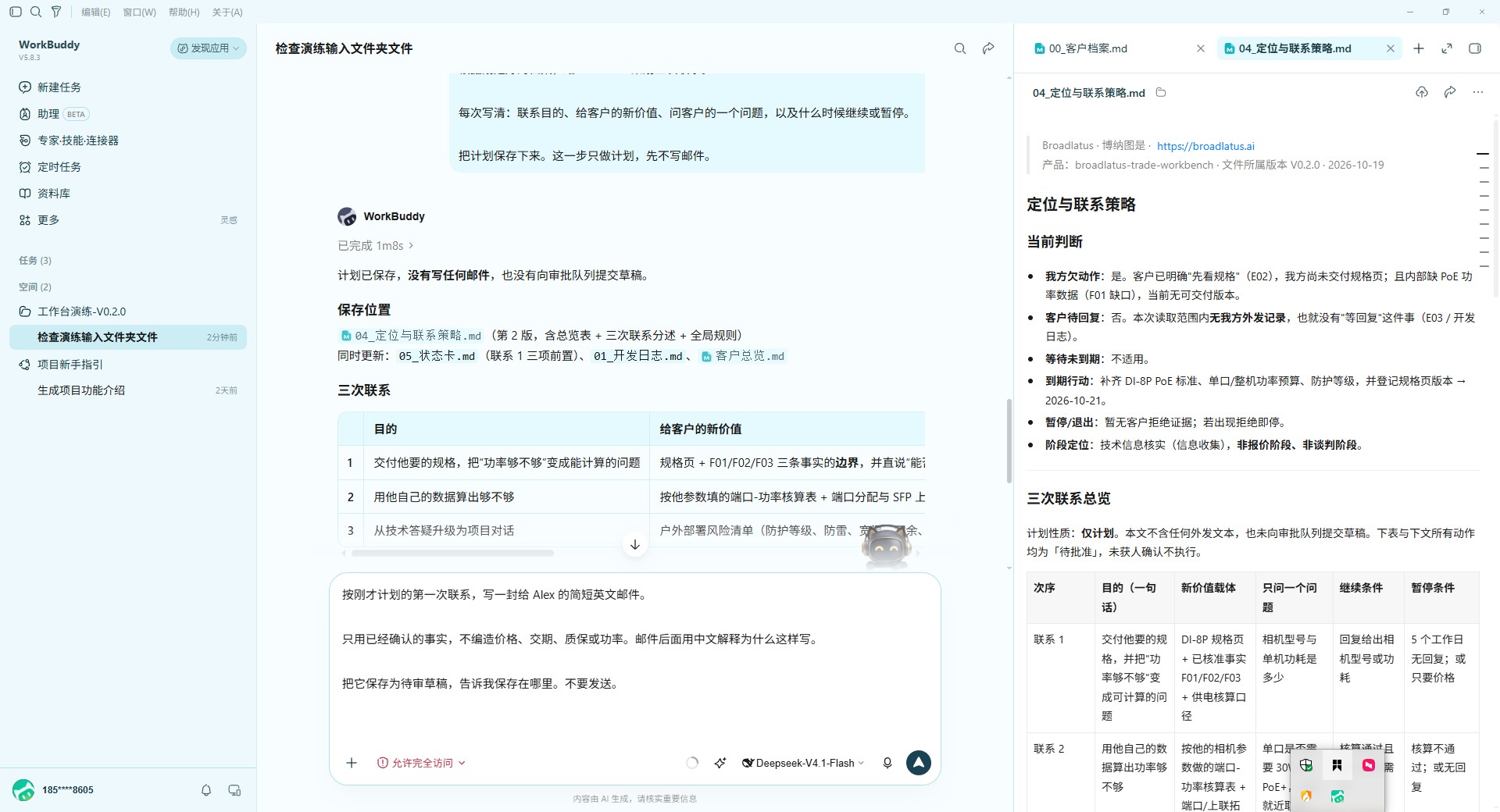
按第一次联系计划,写一封给Alex的简短英文邮件。只用确认事实,不编造价格、交期、质保或功率。邮件后面用中文解释理由。最终稿再核对事实、附件和签名,保存为待审稿并给我链接,不发送。Draft a short English first email to Alex based on the plan and confirmed facts. Do not invent prices, delivery times, warranties or power capacity. Explain the reasoning in English. Check the final version for facts, attachments and signature, save it as a draft and link to it. Do not send.
看到什么才继续Check before continuing
英文草稿和理由已保存;没有实际附件,不出现“已附上”。A saved draft and explanation; no claim of an attachment that does not exist.
真实实测第4步:输入写信要求。此图是发送前的操作画面,不是当前版最终稿或本步完成证明。Actual V0.2.0 test, step 4: typing the draft request. This is not a finished-draft acceptance screenshot.点击查看原图。Open the image to zoom.结果不对怎么办?What if the result is wrong?
把实际结果与上面的预期对照,要求它指出缺口并修正;仍卡住时把版本、步骤和脱敏截图发给产品支持。Compare the output with the expected result. Ask the assistant to identify and correct the gap. If still blocked, send the version, step and anonymized screenshot to support.
第5步 / 共6步Step 5 of 6
处理模拟来信Handle the sample reply
复制这一段到对话框Copy this into the conversation
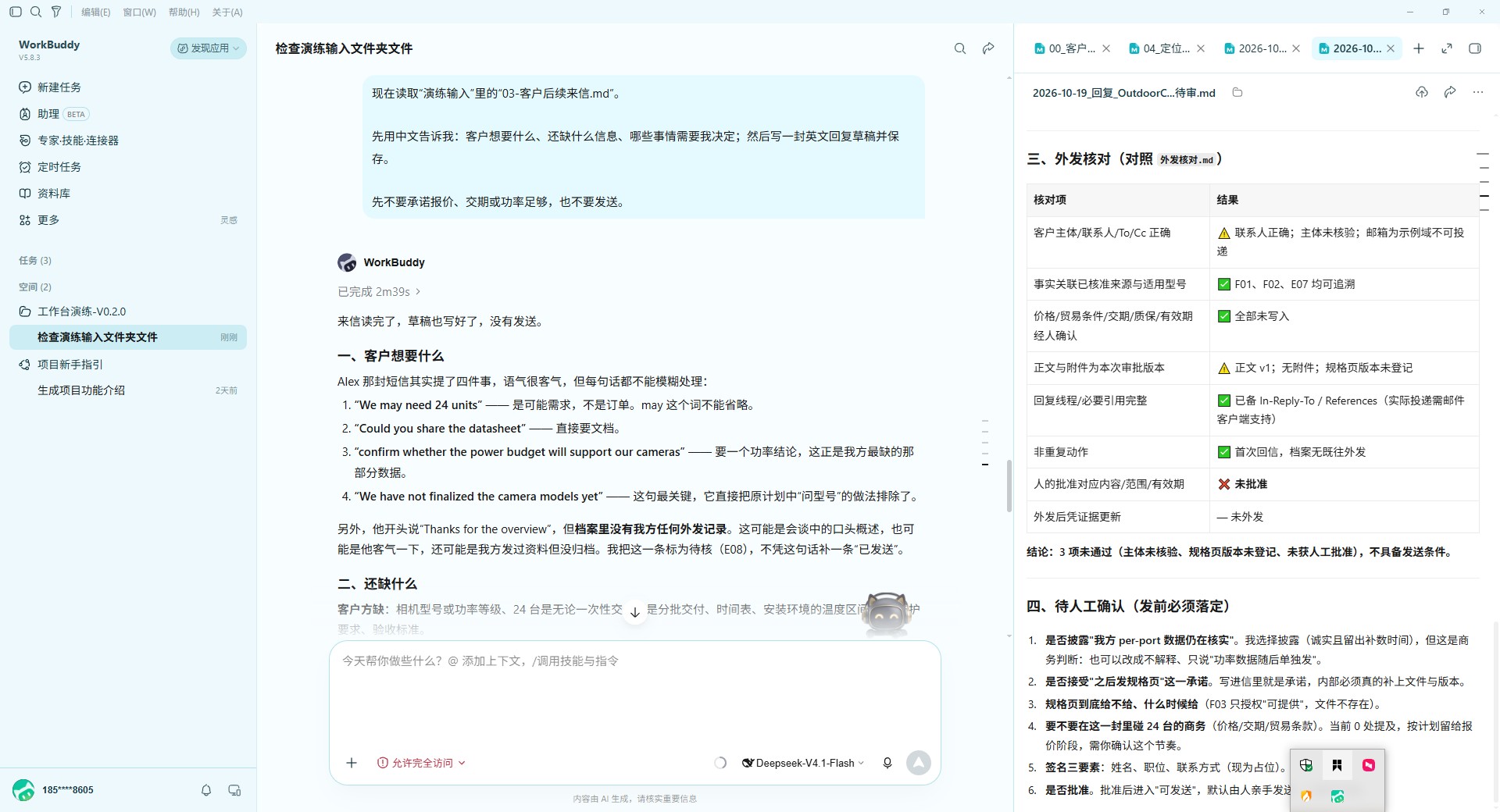
现在读取03-客户后续来信.md。先告诉我客户想要什么、缺什么信息、哪些需要我决定,再写英文回复草稿并保存。不要承诺报价、交期或功率足够,不发送,也不补造之前的已发记录。Now read 03-客户后续来信.md. Explain what the customer wants, what is unknown and what I must decide. Save an English reply draft. Do not promise pricing, delivery or enough power capacity. Do not send or invent a previous sent-message record.
看到什么才继续Check before continuing
识别“可能24台”不是订单;相机型号和功耗仍待确认。“May need 24 units” is not an order. Camera models and power needs remain unknown.
真实实测第5步:解释“可能24台”和未知功耗。原图右侧的审批字段属于旧完整包,免费部署无需审批数据库。Actual V0.2.0 test, step 5: distinguish possible demand from an order and identify missing power data. Old approval fields are outside the free module.点击查看原图。Open the image to zoom.结果不对怎么办?What if the result is wrong?
把实际结果与上面的预期对照,要求它指出缺口并修正;仍卡住时把版本、步骤和脱敏截图发给产品支持。Compare the output with the expected result. Ask the assistant to identify and correct the gap. If still blocked, send the version, step and anonymized screenshot to support.
第6步 / 共6步Step 6 of 6
人作决定、记录下一步Decide & keep the next step
复制这一段到对话框Copy this into the conversation
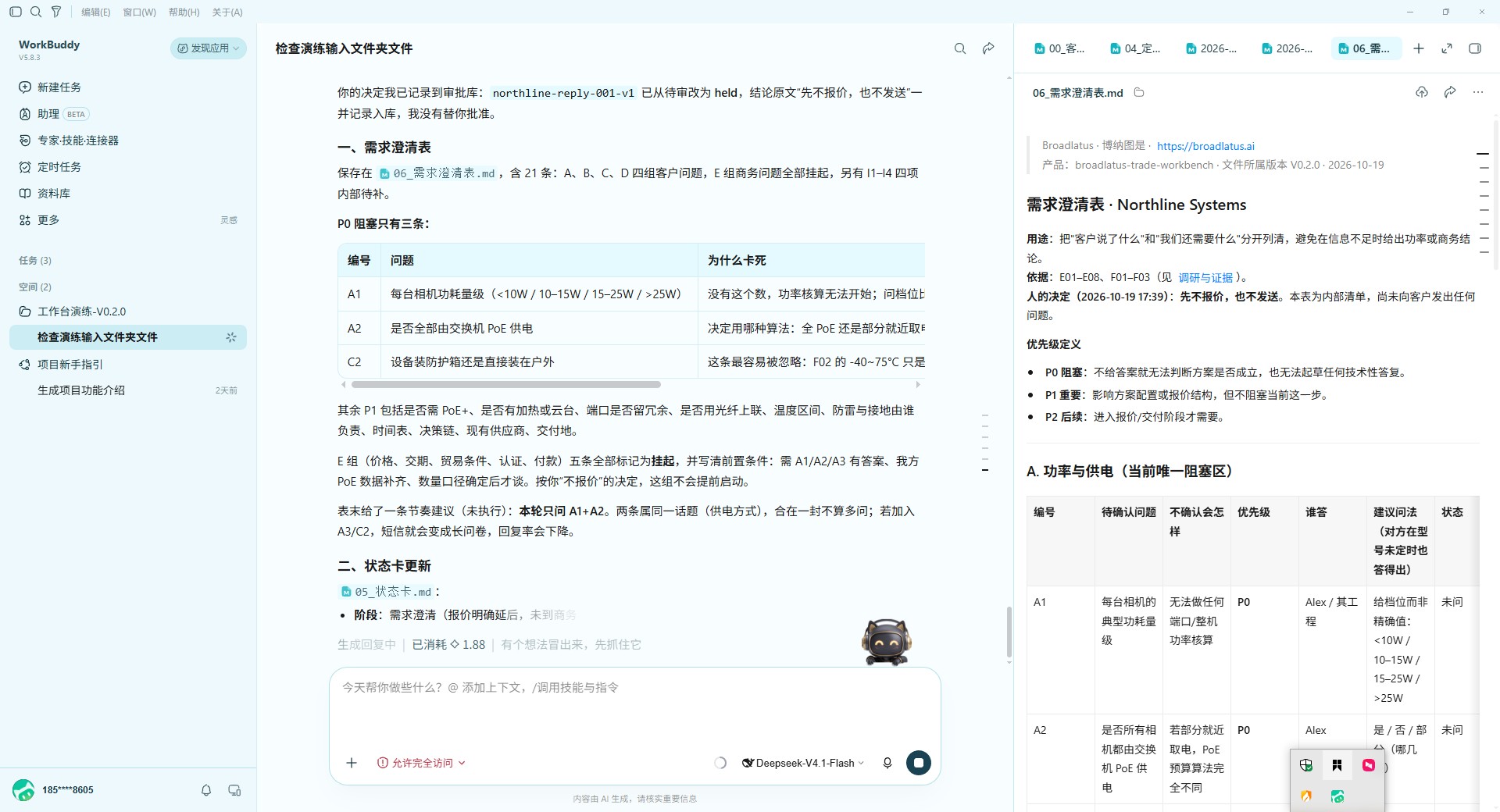
我的决定是先不报价,也不发送。请整理内部需求澄清表,面向客户只选1—2个当前关键问题;更新状态卡,写下一步、谁负责和等什么信息。列出全部生成文件与可点击链接。My decision is no quote and no sending for now. Prepare an internal clarification checklist; select only one or two current questions for the customer. Update the status card with the next step, owner and missing information. List all generated files with clickable links.
看到什么才继续Check before continuing
状态为待确认、未发送;文件能点开。关闭后新开对话后,主动让助手读取这些文件,应能说明当前状态。Status is pending confirmation, not sent. Files open; ask the assistant to read them in a new conversation and describe the current status.
真实实测第6步:人工暂缓与澄清表。截图当时仍在生成,不能把它当作全部完成;你要继续做下一节的文件和新对话验收。Actual V0.2.0 test, step 6: hold and clarify. The screenshot was still generating; complete the file and new-conversation checks yourself.点击查看原图。Open the image to zoom.结果不对怎么办?What if the result is wrong?
把实际结果与上面的预期对照,要求它指出缺口并修正;仍卡住时把版本、步骤和脱敏截图发给产品支持。Compare the output with the expected result. Ask the assistant to identify and correct the gap. If still blocked, send the version, step and anonymized screenshot to support.
完成后,检查成果真的留下了。Finish by checking the saved work.
等第6步完全结束,打开档案、最终邮件稿、来信回复、澄清表和状态卡。新开对话,让助手只读这些文件,告诉你上次停在哪;能恢复,才算这轮走通。Wait until step 6 finishes. Open the archive, final email, reply, questions and status card. In a new conversation, ask the assistant to read those files and identify where you stopped. That checks continuity.